


How to Vote for Governor in São Paulo: Complete Guide
Updated on May 17, 2026. This guide is informational and does not replace official Electoral Justice channels. For final rules, deadlines, and services, check the TSE and the TRE-SP.
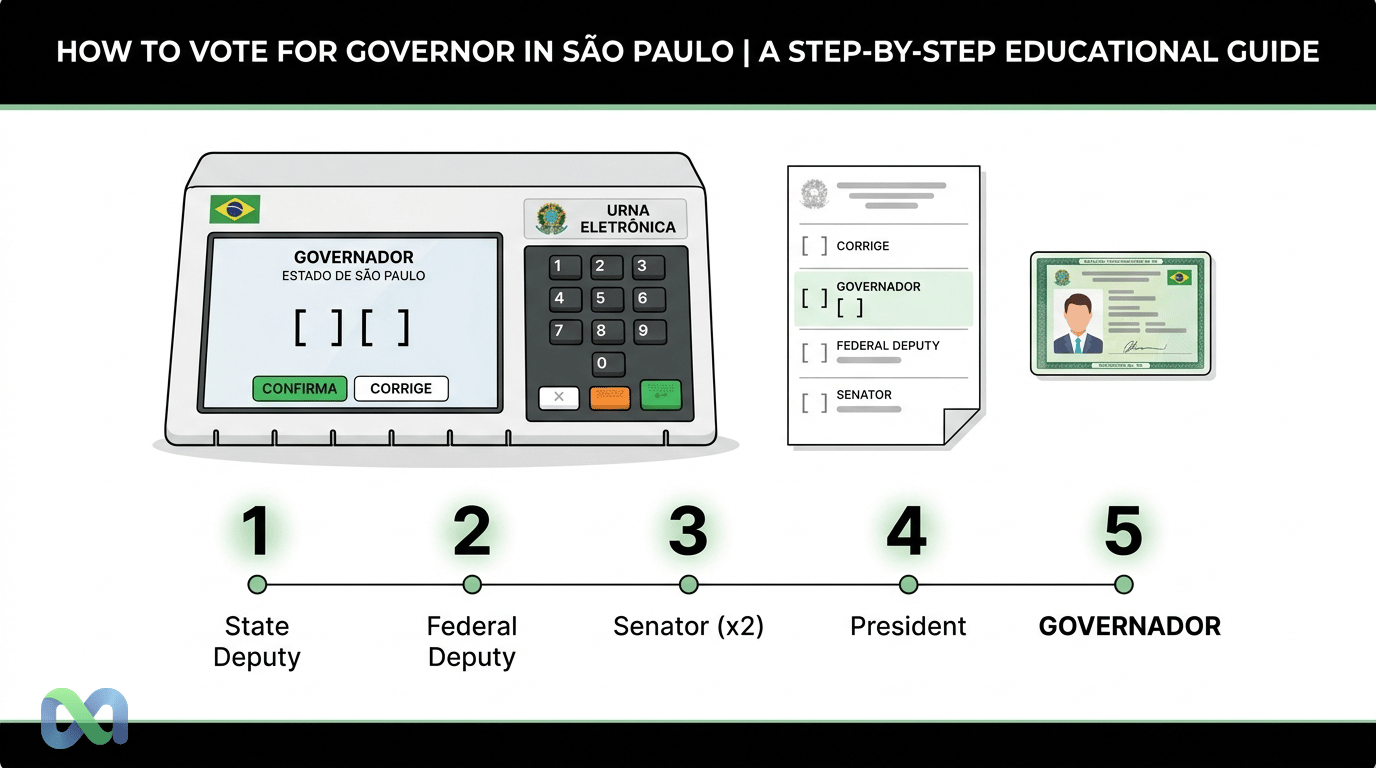
To vote for governor in São Paulo, go to your assigned polling section, bring an official photo ID, follow the voting machine order, and wait until the governor race appears on screen. Then enter your candidate’s number, check the name, photo, party, and office, and press Confirma.
Voting for governor looks simple. Still, a general election usually has several offices on the same voting machine. In 2026, the vote for governor appears after federal deputy, state deputy, and two votes for senator. It comes before the vote for president.
This guide explains how to vote for governor in São Paulo, what to bring, how to check your polling place, and what changes with transit voting. The focus is the process. There is no candidate, party, or voting recommendation.
How to Vote for Governor in São Paulo: Direct Answer
The short answer is: go to your assigned polling section, identify yourself, wait for the voting machine to be released, and vote in the order shown on screen. When “governor” appears, enter the number of your candidate for governor of São Paulo. Check the details and press Confirma.
This is the key point for anyone searching how to vote for governor in São Paulo. Voters do not choose the order of offices. The voting machine shows each step in sequence.
Step by step in 60 seconds
- Check your polling place in advance through TRE-SP or the e-Título app.
- Bring an official photo ID.
- Enter the booth when the poll worker releases the voting machine.
- Vote first for the offices that appear before governor.
- When governor appears, enter the candidate number.
- Check name, photo, number, office, and party.
- Press Corrige if something is wrong.
- Press Confirma if the information is correct.
This quick sequence avoids two common mistakes. The first is thinking the governor vote appears at the start. The second is confirming without checking the information on screen.
What appears on the voting machine screen
On the voting machine screen, the office appears clearly. For governor, the screen shows the field for the candidate number. After you enter it, the machine shows the information linked to that candidacy.
Check everything calmly. Confirm that the office is governor, that the number is correct, and that the photo matches your chosen candidate. If the information does not match, use Corrige before confirming.
What Is the Voting Order on the Machine in 2026?
According to TSE guidance for the 2026 general elections, the voting order will be:
- Federal deputy.
- State deputy.
- Senator, first seat.
- Senator, second seat.
- Governor and vice governor.
- President and vice president.
So keep this simple reference in mind. Governor is the fifth office on the voting machine in 2026. It appears after the two votes for senator.
Federal deputy
The first vote is for federal deputy. This office represents São Paulo in the Chamber of Deputies. The voting machine shows the office and waits for the matching number.
Because this guide is about the vote for governor, it does not detail campaign rules or candidates. The practical guidance is simple: follow the machine order and confirm only after checking the screen.
State deputy
Next comes state deputy. This office represents voters in the Legislative Assembly of São Paulo. It also appears before the vote for governor.
Taking a paper voting note helps. It reduces the risk of mixing up numbers, mainly because a general election has many offices.
Senator: first and second seats
In 2026, there will be two votes for senator. The machine shows one seat and then the other. These two votes appear before the governor race.
This detail matters. Many voters expect to vote for governor right after state deputy. However, in 2026, the two senate votes come first.
Governor and vice governor
The vote for governor also chooses the vice governor on the same ticket. The screen should show both governor and vice governor. For that reason, check the full ticket before pressing Confirma.
To vote for governor in São Paulo, enter the number of your chosen candidate when the machine asks for that office. Do not enter the number before the correct step.
President and vice president
The final vote in the sequence is for president and vice president. After you confirm that vote, the machine ends the process. It plays the final sound.
If you reached the presidential vote, the governor vote has already passed. Therefore, the best protection is to follow each screen carefully.
What to Bring to Vote for Governor in São Paulo
To vote in São Paulo, bring an official photo ID. The e-Título app may also be used when it shows your photo. Even so, many voters prefer to bring a physical document to avoid battery or access problems.
Official checks should be made through TRE-SP and TSE channels. They provide polling section, electoral zone, voter registration status, and available services.
Before leaving home, check these items:
- Official photo ID: always bring one.
- e-Título with photo: it can help at the polling section.
- Physical voter registration card: it helps with lookup, but it does not replace a photo ID.
- Paper voting note: it reduces mistakes in the office order.
- Cell phone in the booth: do not take it in; follow Electoral Justice rules.
Official photo ID and e-Título
A photo ID is the safest way to identify yourself. Common examples include RG, CNH, passport, work card, officially accepted professional ID, and other valid documents.
The e-Título app can make it easier to check electoral data. However, confirm in advance whether the app shows your photo. If it does not, also bring an official photo ID.
Paper voting note: why you should write down numbers
A paper voting note is allowed and very useful. It helps you avoid freezing in the booth or mixing up offices.
Write the numbers in the correct order. For 2026, list federal deputy, state deputy, senator 1, senator 2, governor, and president. That way, the vote for governor is the fifth item on your list.
Voting hours and polling place
The TSE states that the first round of the 2026 general elections will be on October 4. If there is a runoff for governor or president, the expected date is October 25. Voting takes place from 8 a. m. to 5 p. m. Brasília time.
In São Paulo, that time applies directly because the state follows Brasília time. Even so, check your polling place before election day. Polling section changes can happen.
How to Enter and Confirm the Vote for Governor
The practical part of how to vote for governor in São Paulo takes only a few seconds. The ideal approach is not to rush. Read the office on screen, enter the number, and check the displayed data.
If you notice a mistake before confirming, you still have time to correct it. After confirmation, that vote is recorded.
Enter the candidate number
When the voting machine shows the governor office, enter the number of your chosen candidate. Use the machine’s numeric keypad. Do not try to skip steps.
If you do not remember the number, the machine will not suggest candidates. That is why a paper voting note is useful. It keeps your choice organized and reduces typing errors.
Check name, photo, office, and party
After entering the number, check the displayed data. The office must be governor. The photo, name, number, and party must match your choice.
Also check the vice governor linked to the ticket. The vote is for the ticket, not just for one person alone.
Use Corrige if you make a mistake and Confirma when it is right
If you entered the wrong number, press Corrige. Then enter the correct number. Only press Confirma after reviewing the screen.
This habit matters for every office. In the governor vote, it helps avoid recording a choice different from the one you intended.
Blank and null votes: what they mean on the machine
The voting machine also allows a blank vote. In addition, an invalid number can produce a null vote when the voter confirms it. These options are part of the electoral process.
This article does not recommend any form of vote. Its purpose is to explain how the machine works so you understand the process and decide independently.
Transit Voting: Can You Vote for Governor Outside São Paulo?
Transit voting requires special attention. The rule depends on where the voter will be on election day and what was requested within the official deadline.
In general, voters must confirm the rules for that election year with the TSE and TRE-SP. Deadlines, available locations, and eligible offices may have specific conditions.
When a voter may still vote for governor
The vote for governor is tied to the state. Therefore, the possibility of voting for governor while in transit depends on the applicable rule and the voter’s location on election day.
If the voter is outside the municipality but still inside the state of São Paulo, the situation may differ from being in another state. For that reason, check the current rule before the final deadline.
When transit voting is limited to president
When voters are outside the federation unit of their electoral domicile, transit voting may be limited to president. This is one of the most important questions for anyone who will be traveling.
For example, a São Paulo voter who is in another state on election day should check whether they can vote only for president. Do not assume the governor vote will be available.
Deadlines and rules must be confirmed with TSE/TRE-SP
Transit voting is not solved on election day. Usually, it requires a request within a deadline set by the Electoral Justice system.
Check official channels in advance. The TRE-SP help page and TSE pages on electoral services are the safest sources.
Frequently Asked Questions About Voting for Governor in São Paulo
This section answers practical questions from people searching how to vote for governor in São Paulo. The answers are direct, but each case may require an official check.
Do I need a physical voter registration card to vote?
In general, voters need to identify themselves with an official photo ID. The physical voter card helps locate information, but it is usually not the main identification document.
Even so, bring whatever is useful for you. A photo ID and a confirmed polling place are the main points.
Can I vote without registered biometrics?
Lack of biometrics should not be handled based on rumors. Check your voter status through official channels. The system will show whether there is a pending issue or a need for regularization.
If there is a regularization deadline, solve it before election day. On election day, the poll worker follows the official record available at the polling section.
What happens if I forget the candidate number?
The voting machine is not a search tool. It does not list candidates for you to choose from. You need to enter the number.
That is why you should bring a paper voting note. It is simple, legal, and very useful in an election with several offices.
How do I correct a wrong number on the voting machine?
Before confirming, press Corrige. Then enter the correct number and check the screen again. Only then press Confirma.
If you already pressed Confirma, you cannot go back to that step. Therefore, review before finishing each office.
How do I justify my absence if I cannot vote?
The justification must follow Electoral Justice channels and deadlines. The e-Título app is often an important option, but official rules should be checked for the current election.
If you know you will be away, organize it in advance. The same applies to transit voting when it is available.
Simple Checklist for Election Day
Before leaving home, make a quick check. It reduces mistakes, delay, and stress at the polling section.
- Check your polling place on TRE-SP or e-Título.
- Bring RG, CNH, or another photo ID.
- Leave with enough time.
- Bring a paper voting note.
- Review the office order.
- Remember that governor is the fifth vote in 2026.
- Go between 8 a. m. and 5 p. m.
- Read each screen.
- Type calmly.
- If you make a mistake, press Corrige.
- If it is correct, press Confirma.
This checklist summarizes how to vote for governor in São Paulo safely. The governor step is only one part of the sequence. Still, it deserves attention because it comes after two votes for senator.
Quick summary to avoid mistakes
Go early. Bring a photo ID. Bring a paper note. Enter the booth only when the poll worker releases the machine.
Read the screen before typing. The machine shows one office at a time. Do not try to vote out of order. Wait for the governor screen.
On the governor screen, enter your chosen number. Check the name, photo, and party. Also check the vice governor on the ticket. If something is wrong, correct it.
If everything is right, confirm. Then move on to the presidential vote. At the end, wait for the final sound from the machine.
If you have a question, ask the poll worker before voting. Do not ask for an opinion about a candidate. Ask only for guidance on using the machine.
Pocket Guide: How to Vote Without Rushing
Use this block as a final review. It repeats the most useful points in short sentences. The idea is to give you an easy script for election day.
Before election day, check your polling place. Save your electoral zone and section. If you can, take a screenshot outside the booth. On the day, bring paper. On the paper, write each office in order.
When you arrive, enter the correct line. Keep your ID ready. Speak to the poll worker if you have a question about the room. Do not talk about your vote or candidate.
In the booth, look at the screen. The machine sets the pace. Each screen shows one office. You do not need to rush. You can read, type, and check.
For governor, wait for the correct screen. It will come after two votes for senator. When it appears, enter the number. Check the photo. Check the name. Check the office. Check the party. Check the vice governor.
If something does not match, use Corrige. Type again. Check one more time. Use Confirma only when the screen is correct.
If your hand shakes or your mind goes blank, pause for a moment. Read your paper note. Breathe and follow the order. The voting machine does not close because you took a few extra seconds.
If you do not know how to use the voting machine, call the poll worker. Ask for help with the button or the screen. Do not ask for voting advice. The vote is yours.
At the end, wait for the final sound. Leave the booth and clear the space. Keep your paper. Done: your vote was cast in the machine order.
Simple mistakes you can avoid
Do not wait until the last minute to check your polling place. Sites and apps can be slow on election day. Check earlier.
Do not rely only on your phone. Batteries die. Signal fails. Paper does not.
Do not enter the booth without knowing the order. In 2026, governor does not come near the start. It is the fifth vote.
Do not confirm too quickly. The screen exists for review. Use that step in your favor.
Do not treat rumors as rules. For electoral matters, the right source is the Electoral Justice system. If a rule changes, the TSE and TRE-SP should be your base.
How to Track the São Paulo Governor Election With Data
After understanding how to vote, many voters also want to track scenarios. Polls, the electoral calendar, debates, alliances, and market probabilities help organize the reading of the race.
This analysis does not replace the vote. It also does not define who “should” win. It shows how expectations change as new information enters the public debate.
Polls, electoral calendar, and market probabilities
Election polls measure voting intention in a sample, within a specific methodology. The electoral calendar shows official deadlines. Prediction markets aggregate expectations from participants who trade future scenarios.
Each source answers a different question. Therefore, the most useful reading combines context, method, and transparency.
Why prediction markets are not voting recommendations
Prediction markets do not tell you who to vote for. They express implied probabilities about events. This can help analysts follow scenario changes, but it does not replace civic judgment.
At Macro Markets, the reading is data-oriented. The focus is probabilities, transparency, and the evolution of expectations, not electoral propaganda.
Transparency and professional scenario analysis
A race for governor of São Paulo can shift with polls, debates, endorsements, rejection rates, economic data, and national events. Following probabilities helps show these changes in a structured way.
Still, the vote is personal and secret. Use data to become better informed, not to outsource your decision.
Conclusion
Knowing how to vote for governor in São Paulo requires three things: check your status before the election, understand the voting machine order, and review the data before confirming. In 2026, governor is the fifth vote, after federal deputy, state deputy, and two votes for senator.
On election day, bring an official photo ID, check your polling section, use a paper voting note, and follow each screen calmly. When the governor office appears, enter your chosen number, check name, photo, party, office, and vice governor, and press Confirma.
To follow the São Paulo governor election beyond the voting procedure, use official sources for rules and calendar. For scenario analysis, follow polls, verified news, and market probabilities with critical judgment. Macro Markets helps with that data reading, always without making voting recommendations.
Final Review Before Confirming
Do one last mental review in the booth. Correct screen. Correct number. Correct name. Correct photo. Correct office. Only then confirm.
If the screen is not for governor, do not enter the governor number. Wait for the right step. The voting machine order is fixed.
If you typed the wrong number, do not panic. Press Corrige. The vote has not been saved yet. Type again and check.
If you already confirmed, move forward. The machine goes to the next office. That is why checking before the green button is so important.
At the end, remember the basics. Document, location, paper note, calm, and review. Those five points are enough to vote well on election day.
Short Guide for Anyone Who Only Wants the Basics
If you can, go early. If you can, bring RG. If not RG, bring CNH. Bring a sheet of paper. On that paper, write your names and numbers.
In line, stay calm. At the desk, show your document. At the voting machine, read the screen. If the screen shows another office, do not use the governor vote.
When the governor screen appears, look carefully. Enter the number. Check the photo. Check the name. Check the office. If everything is okay, confirm.
If it is not okay, correct it. There is no rush. The machine was designed for that. You can review before giving the final yes.
At the end, listen for the sound. Leave the room. The act is done. Simple as that.
For peace of mind, follow one plan. Go, look, vote, and check. If there is an error, go back. If it is right, confirm.