


Overseer Studio: The Best Digital GM Screen Software for Tabletop RPGs
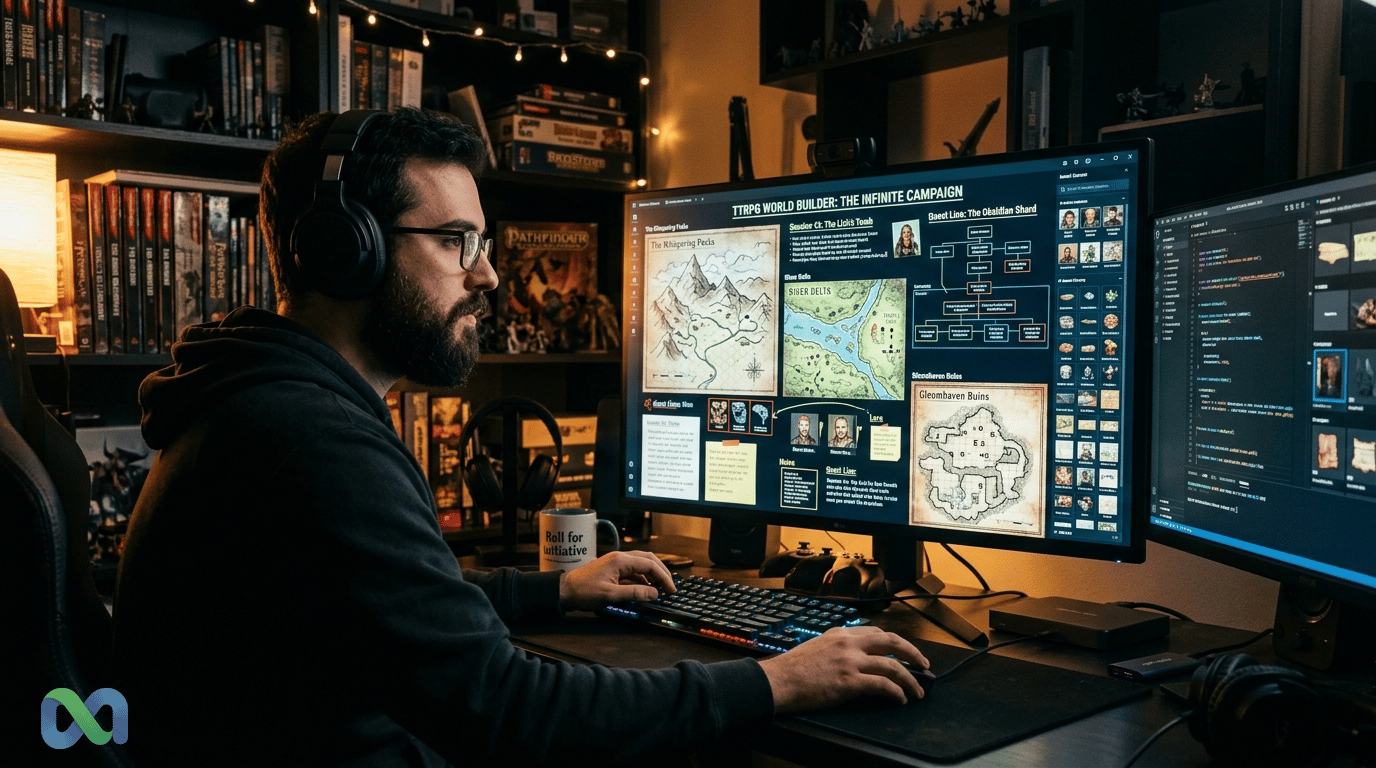
If you've lost game momentum fumbling between a PDF rulebook, browser tabs, background music, and your VTT, you know the problem. Overseer Studio is digital GM screen software built specifically to solve it. A developer named "nullfish" launched it on Hacker News in September 2026. The tool borrows the infinite canvas concept from Figma and Miro and applies it directly to running a TTRPG session.
This review breaks down what this digital GM screen software does, how it compares to Roll20 and Foundry VTT, and whether the $24 one-time price is worth it.
The Problem: Alt-Tab Hell for Game Masters
Running a tabletop RPG session as the GM is a logistical challenge. You are the narrator, referee, actor, and rules lawyer all at once. In a digital setup, that means juggling many different software tools simultaneously.
How GMs Actually Run Sessions Today
A typical GM laptop setup includes a VTT for maps and tokens. Add a PDF reader for the rulebook, a browser tab for the wiki, a notes app for session prep, and a music player for ambiance. None of these tools communicate with each other. Switching between them means losing your place, breaking the fiction, and slowing down the game.
Physical GM screens solved this for in-person play in the 1970s. A cardboard panel held quick-reference charts and hid dice rolls. The digital equivalent never caught up. VTTs focused on map hosting, not GM workspace management.
Why a Second Monitor Misses the Point
The common advice is to get a second monitor. However, a second monitor gives you more windows, not a unified workspace. You are still alt-tabbing and still losing your train of thought mid-encounter.
The problem is not screen real estate. It is the absence of a spatial mental model. Your GM prep exists in your head as a connected map of information. Tab-based software breaks that map.
The Creative Flow State Problem
Game mastering needs creative flow. You are making up dialogue, tracking turns, and reading rules at the same time. Each switch between tools costs focus. Breaks in creative work take time to recover from.
For a GM running a four-hour session, that cost compounds quickly. The tools are not built for the mental state that effective game mastering requires.
What Is Overseer Studio?
Overseer Studio is digital GM screen software built as an infinite canvas desktop application. It lets you arrange websites, PDFs, apps, and music players on a single spatial canvas. Built with Electron, React, Pixi. js, and XState, it costs $24 as a one-time purchase.
The core idea: replace your tab bar with a unified digital GM screen software workspace. Instead of alt-tabbing, you pan and zoom across the canvas to reach what you need.
The Infinite Canvas Concept Applied to Tabletop
The infinite canvas idea comes from design tools. Figma and Miro made it mainstream for design teams. The mental model is a desk you can spread across, no folders, no tabs, just space.
Overseer applies that same metaphor to a GM's session prep. You drop encounter maps, NPC reference sheets, and rule lookups onto the canvas. You organize them spatially. The combat zone sits in one area, the social encounter notes in another. During play, you navigate between areas instead of switching windows.
The spatial layout matches how GMs think about their sessions. Encounters have physical spots. NPCs link to factions. The canvas makes that structure easy to see and reach.
Core Features
Overseer's features focus on session-day use rather than prep:
- Panels: Embed websites, local files, and apps as panels on the canvas.
- Screens: Save named canvas configurations for different sessions. Switch between your "dungeon crawl" screen and your "city hub" screen instantly.
- Shortcuts: Assign keyboard shortcuts to canvas navigation points. Jump directly to your initiative tracker without panning.
- Plugins: Extend Overseer with game-system-specific panels for D&D, Pathfinder, Call of Cthulhu, and more.
The tool wraps around your existing workflow. It does not replace it.
Tech Stack: Why It Matters
Overseer runs on Electron, the same framework that powers VS Code and Slack. This means it runs locally. There are no cloud servers, no account requirements, and no internet dependency during play.
React handles the interface. Pixi. js powers the canvas, giving smooth performance with many open panels. XState manages app state, which keeps navigation fast and bug-free.
This stack is not beginner work. XState in particular shows the developer cared about predictable behavior in a complex app.
Overseer Studio vs. Roll20, Foundry VTT, and Other Tools
The most important point: Overseer Studio is not a virtual tabletop. Roll20 and Foundry VTT run the game, maps, tokens, dice rolls, and character sheets. Overseer is digital GM screen software for session workspace. These are different product types.
GM Screen Tools vs. Virtual Tabletops: A Different Category
| Feature | Overseer Studio | Roll20 | Foundry VTT | Fantasy Grounds |
|---|---|---|---|---|
| Category | Session workspace | Full VTT | Full VTT | Full VTT |
| Hosting | Local (Electron) | Cloud | Self-hosted | Local/cloud |
| Pricing | $24 one-time | Free / $9.99/mo | $50 one-time | $3.99–$9.99/mo |
| Infinite canvas | Yes | No | No | No |
| Player-facing maps | No | Yes | Yes | Yes |
| Plugin system | Yes | Yes | Yes | Yes |
| Offline use | Yes | No | Partial | Yes |
| GM workspace focus | Yes | No | No | No |
Roll20's free tier works well. Pro adds map lighting at $9.99 per month. Foundry VTT costs $50 once but needs setup and self-hosting. Fantasy Grounds has the deepest rule support but the highest long-term cost.
None of these solve the alt-tab problem. All of them expect you to manage your own notes and prep materials on your own.
When to Use Overseer Alongside a VTT
The best setup is running Overseer side by side with your VTT, not instead of it. Your canvas can include a Roll20 session as one panel, encounter notes as another, ambient music in a third, and a monster manual PDF in a fourth. You navigate the canvas instead of alt-tabbing.
For in-person games, Overseer sits on your GM laptop while players gather around a TV or physical table. Your entire session prep lives on the canvas.
For online games, you still need a VTT to show players the game. Overseer handles the GM side, the workspace your players never see.
The Plugin System: Extending Overseer for Any Game System
The plugin architecture separates Overseer from a generic window manager. A well-designed plugin surfaces game-system-specific content directly inside the canvas.
What Plugins Can Do
A D&D 5e plugin could embed D&D Beyond monster lookups with session-specific bookmarks. A Call of Cthulhu plugin could show sanity roll tables. A Pathfinder 2e plugin could display the action economy reference GMs check constantly during play.
This is the difference between pasting a website into a panel and actually integrating your game system into your workspace. Plugins allow the canvas to speak the language of your specific game.
Current Plugin Ecosystem Status
Overseer launched in September 2026. The plugin ecosystem is in its early stage. Community-built plugins will develop as the user base grows. This is normal for new developer tools, the core infrastructure exists before the library follows.
For GMs comfortable with web development, the plugin API opens custom integrations that no commercial VTT has offered. The Show HN thread generated significant interest from developers in the TTRPG community.
How to Build a Custom Plugin
The Electron and React base makes plugin work easy for anyone who knows JavaScript. Overseer's panels are web views. Any web-based tool, wiki, or Notion database can be embedded as a plugin with little effort.
GMs who maintain custom homebrew web apps can integrate them directly into the canvas. This capability does not exist in any standard VTT.
Pricing: $24 One-Time vs. Subscription Fatigue
Subscription fatigue is real in TTRPG tooling. BBC News and other outlets have covered how consumers face mounting subscription overload across software categories. Consider a GM who subscribes to Roll20 Pro, Syrinscape for music, and World Anvil for campaign management. That is already $30-plus per month for tools that do not communicate with each other.
Therefore, Overseer's $24 one-time price is deliberate counter-positioning. You pay once. The software runs locally. There is no recurring cost and no dependence on the vendor staying in business.
What $24 Buys You
At launch, $24 covers the application with the infinite canvas, the panel system, screens, and keyboard shortcuts. The long-term update policy is not yet published in detail. However, the local-first, no-subscription model puts Overseer in the same pricing philosophy as Foundry VTT, at a lower price point and narrower scope.
Is It Worth It? The Value Calculation
If Overseer saves you 20 minutes of context switching per session and you run two sessions per month, that is 40 minutes of recovered flow time monthly. Over one year, that is roughly 8 hours of better GM focus for $24. The math favors any regular GM.
The question is whether the workflow change is worth the adjustment period. Some GMs have deeply ingrained habits around their existing setups. Overseer introduces a new mental model that requires intentional adoption.
Who Should (and Shouldn't) Use Overseer Studio
Not every GM needs this digital GM screen software. Understanding the right use case prevents a misaligned purchase.
Best For: In-Person GMs with Complex Session Notes
Overseer works best for GMs running in-person games with elaborate campaign prep. If your session notes reference fifteen locations, eight NPCs, and a dungeon map, and you need to navigate between them quickly during play, the spatial canvas directly addresses your workflow.
Long-form campaign GMs benefit more than one-shot GMs. The organizational payoff increases with session complexity.
Works Alongside: Roll20, Foundry, and Physical Notebooks
Overseer does not require you to abandon your VTT. If you run Roll20 sessions, Overseer sits on your GM machine while Roll20 runs embedded as a canvas panel. You get organized without changing your player-facing infrastructure.
Physical notebook users can digitize their session prep into Overseer while keeping handwritten notes for the tactile experience. The canvas does not impose a format.
Not the Right Tool For: Online-Only GMs Who Need Token Maps
If your primary challenge is dynamic maps and character sheet integration, you need a better VTT. Digital GM screen software like Overseer does not handle player-facing content. Your players cannot see the Overseer canvas. It is a GM-only tool.
GMs who want a single solution covering both workspace and player presentation need a full VTT. Overseer is deliberately scoped to the GM side of the equation.
The Show HN Factor: Why Community Validation Matters
The developer chose Hacker News as the launch platform. Show HN posts attract technically sophisticated early adopters who stress-test assumptions, ask hard questions about architecture, and provide feedback most product launches never receive.
A good Show HN thread is a real signal. It shows the product solves a true problem. For GMs who want tools that work, a Show HN result beats a marketing claim.
The developer built this because they needed it. The community confirmed the need was not just theirs alone.
Verdict: A New Category of Digital GM Screen Software
Overseer Studio creates a distinct product category: digital GM screen software for session workspace management. It does not replace VTTs. It wraps around them and solves the tab chaos problem that no VTT has ever prioritized.
The infinite canvas paradigm is the right mental model for how GMs think about sessions. The local-first, no-subscription model is the right business model for a niche tool. The Electron and Pixi. js stack delivers the right technical foundation for smooth canvas performance across platforms.
The plugin ecosystem is early. The update roadmap is not yet public. But at $24 one-time, the risk is low for any GM serious about their workflow.
For any GM who has lost session momentum to an alt-tab spiral, Overseer Studio is the most purposeful digital GM screen software built to date. Try it at overseer. studio.
If you're tracking broader trends in gaming software markets, including how indie developer tools gain traction, Macro Markets runs live prediction markets on technology sector developments you can follow and trade on.