Prediction Market Arbitrage Calculator: Fees and Outcomes

Prediction Market Arbitrage Calculator
Model two complementary binary positions held through settlement. Enter executable buy prices in cents, whole-contract quantities, the payout in USD per winning contract, and total fees for each leg. Defaults are hypothetical, not live prices or platform fees.
Rules not verified. Scenario figures below assume complementary contracts; no minimum result is verified.
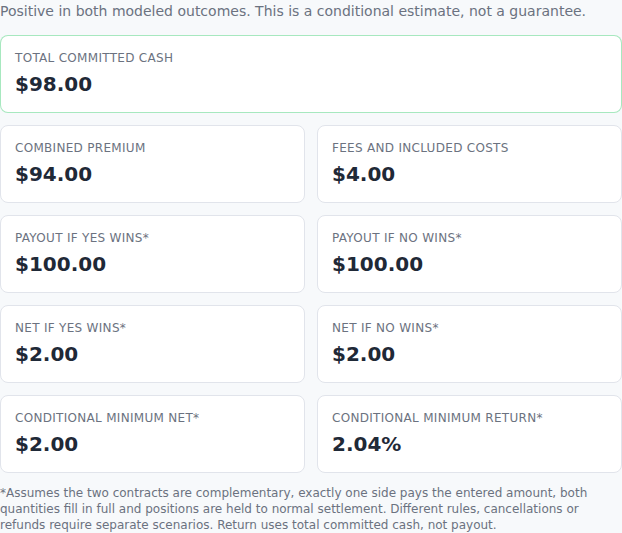
*Assumes the two contracts are complementary, exactly one side pays the entered amount, both quantities fill in full and positions are held to normal settlement. Different rules, cancellations or refunds require separate scenarios. Return uses total committed cash, not payout.
Educational estimate only. No live quotes, fee presets, atomic execution or automatic funding, currency, tax, slippage or withdrawal adjustments. Review eligibility and the actual contracts. Nothing is submitted or traded.
Use this prediction market arbitrage calculator to compare the cash cost and conditional settlement results of two complementary binary positions. Enter the executable Yes and No purchase prices, the quantity on each side, the winning payout per contract and the total fees and other costs you want included.
The calculator is free and runs in your browser. It does not connect to an exchange, request an account, submit orders or search for live opportunities. Its initial values are a hypothetical example: 100 Yes contracts at 48 cents and 100 No contracts at 49 cents, with an assumed $2 fee for each order. Those positions cost $101 against a conditional $100 payout, leaving a $1 loss.
Reviewed November 6, 2026. Macro Markets publishes this tool and operates a crypto-native prediction platform. All prices and fees in the worked examples are invented inputs for checking arithmetic, not quotes or fee schedules from Macro Markets, Kalshi or Polymarket.
How to Use the Prediction Market Arbitrage Calculator
Begin with the prices at which you can buy the required size, rather than a last-traded price or midpoint. An order book may show a cheap offer for only a few contracts. If your order fills across several price levels, use the average execution price for that side.
The calculator takes eight numerical inputs:
- Yes buy price: cents per contract for the Yes exposure you are buying.
- No buy price: cents per contract for the complementary No exposure.
- Yes contracts: the whole-contract quantity on the first side.
- No contracts: the whole-contract quantity on the second side.
- Yes leg fees: the total dollar fee for that entire order.
- No leg fees: the total dollar fee for that entire order.
- Other included costs: additional dollar costs you choose to allocate to this position, entered once.
- Winning payout per contract: the dollar amount a winning contract pays. The default is $1, and this version assumes the same amount for both sides.
Prices are in cents, while fees, other costs and payouts are in US dollars. Enter a $2 total order fee as 2, not as 2% or a per-contract rate. Enter zero explicitly when a cost is zero. Leaving a required field empty removes the results and shows a validation message.
This version accepts whole contracts from zero to one million on each side, with at least one quantity above zero. It does not round a fractional position into an integer. A venue that supports fractional contracts needs a separate calculation at its actual precision.
Why There Are Two Confirmation Boxes
Checking a price difference is easier than checking the underlying trade. Before showing a numerical minimum net result, the tool asks you to confirm two things:
- The contracts are complementary, their settlement rules match and exactly one side pays the entered winning amount.
- Both entered quantities actually filled at the entered prices and costs.
You can inspect the hypothetical outcome figures before checking those boxes. The minimum result remains Not verified. Your confirmations are your own checks; the calculator does not verify contracts or executions on your behalf.
Changing an input clears the execution confirmation, because the earlier confirmation no longer describes the new numbers. Changing the payout also clears the rules confirmation. Reset restores the hypothetical example and clears both boxes.
For the economic reasoning behind those checks, read our prediction market arbitrage guide. This page focuses on using and checking the tool rather than finding an arbitrage opportunity.
Understand the Results and Formula
For this two-position model, the combined premium is:
Premium = Yes quantity × Yes price ÷ 100 + No quantity × No price ÷ 100
The total cash committed is:
Total cost = premium + Yes fees + No fees + other included costs
The two normal-settlement scenarios are calculated separately:
If Yes wins: payout = Yes quantity × winning payout per contract
If No wins: payout = No quantity × winning payout per contract
In each scenario, net result = that scenario's payout − total cost. The conditional minimum is the smaller of the two net results. The conditional minimum return divides that smaller net result by total committed cash, then multiplies by 100.
A positive number means both modeled normal outcomes exceed the entered cost, subject to the assumptions. It is not evidence that either order can fill, that the rules match, or that no additional cost applies. At exactly zero cost, a percentage return has no meaningful denominator, so the tool shows N/A instead of an infinite return.
Conditional Means the Rules Still Matter
The two-outcome model assumes exactly one side pays and the other pays zero. It does not prove that assumption from similar contract titles. The Polymarket US resolution documentation describes its resolution process; you must still read the specific contracts being compared.
A cancellation, refund, invalid market or different observation window can create an outcome outside the model. If those provisions differ, do not interpret the displayed minimum as a payout floor. Work through the additional scenario separately.
Our prediction-market comparison methodology explains why matching the exact contract is more useful than ranking an entire platform from a single displayed price.
Worked Examples: Fees and Unequal Quantities
The following examples use generic complementary $1 contracts held to normal settlement. Each assumes a $2 total fee per leg and no other included cost. They are original hypothetical calculations, not actual platform offers.
| Input or result | 48¢ Yes + 49¢ No | 45¢ Yes + 49¢ No |
|---|---|---|
| Quantity on each side | 100 | 100 |
| Combined premium | $97 | $94 |
| Assumed total fees | $4 | $4 |
| Total committed cash | $101 | $98 |
| Conditional payout | $100 | $100 |
| Conditional net | −$1 | +$2 |
The first pair looks cheaper than $1 before fees because 48 cents plus 49 cents is 97 cents. Buying 100 pairs costs $97, but adding $4 in assumed fees raises the total to $101. The conditional net result is negative whichever normal outcome wins.
In the second example, changing only the Yes price to 45 cents reduces the premium to $94. The $4 of assumed fees brings total committed cash to $98. A conditional $100 settlement payout leaves $2, or approximately 2.04% on the $98 committed. That is not an annualized return and excludes taxes, funding delays and any cost you did not enter.
What Happens When Only 60 No Contracts Fill?
Keep the first example's prices, but change the No quantity from 100 to 60. For this illustration, keep the entered fee at $2 for each leg; in a real partial fill, replace that assumption with the actual charged fee.
The premium becomes $48 + $29.40 = $77.40. Adding $4 of assumed fees gives a total cost of $81.40.
- If Yes wins under matching rules, the 100 Yes contracts pay $100. The net is +$18.60.
- If No wins under matching rules, the 60 No contracts pay $60. The net is −$21.40.
The calculator reports 40 unmatched contracts. Keeping both outcome figures visible prevents a profitable-looking side from hiding the other side's loss. The conditional minimum is −$21.40, rather than the gain from the better outcome.
Two orders on separate venues are independent actions. The Polymarket US order-type documentation explains its order mechanics. A calculation or scanner does not turn separate orders into one atomic execution. Start with our beginner trading guide if fills and order types are unfamiliar.
Which Fees and Costs Should You Enter?
Use the order preview for a proposed position and the actual execution record for a completed one. Do not mix a displayed per-contract rate with a total dollar field. For a partial fill, confirm the charged amount rather than assuming it scales perfectly with quantity.
Kalshi's official fee guidance says fees can differ between markets and that some resting orders incur maker fees when executed. A limit order therefore should not automatically be treated as fee-free.
Polymarket US publishes its own fee schedule, including rules and examples. Its US documentation should not be treated as the international Polymarket platform's fee schedule. This calculator deliberately has no platform preset; enter the actual fee applicable to each leg.
Put known additional charges in the other-cost field only once. Possible inputs include a funding cost allocated to this trade, an applicable withdrawal charge or a currency conversion charge already expressed in dollars. The tool does not fetch exchange rates or determine which charge applies to you.
Spread and slippage should generally be reflected in the executable or average fill price. Adding them again as a separate cost would double count them. An early exit needs its own future sale price and possible exit fees; this tool models holding through settlement.
For one position's winning payout and break-even probability, use the separate prediction market fee calculator. The arbitrage calculator instead keeps two complementary positions and their different outcome quantities in one view.
Using the Tool with Macro Markets and Other Venues
Macro Markets is our own crypto-native prediction-market alternative. Eligible users considering it alongside other venues should inspect the exact contract, executable size, funding route, currency and applicable fees before entering numbers. The calculator does not connect to Macro Markets or any other exchange.
A comparable topic does not establish a comparable contract. Crypto collateral, network costs, separate balances and different resolution rules can change the analysis. Macro Markets should not be treated as a CFTC-designated US exchange, and this page makes no claim that it shares another venue's order book or can transfer a position into that venue.
Keep legal eligibility separate from the arithmetic. A positive hypothetical result does not establish that you can open or fund both accounts from your location. Our prediction-market legality guide provides context; confirm current access directly with each venue.
To analyze one purchased side using your own probability estimate, try the prediction market expected value calculator. Its probability scenarios are assumptions; they do not turn a directional trade into arbitrage.
Frequently Asked Questions
Is this a live arbitrage scanner?
No. It is a manual calculator. It does not fetch market prices, find matching contracts, check order-book depth or execute a trade. You provide the inputs and verify the rules and fills.
Can I calculate Kalshi and Polymarket arbitrage here?
You can enter hypothetical or actual costs from two positions if they fit this model. That does not establish that the contracts are complementary or that you can access both products. Distinguish Polymarket US from international Polymarket, and use the correct product's current documentation.
Why does the tool ask for both quantities?
Equal intended orders can produce unequal fills. Separate quantities let the tool show the resulting payout difference and unmatched exposure instead of pretending every position has a completed counterpart.
Are the default $2 fees real platform fees?
No. They are explicit hypothetical order-level fees chosen to show why a quoted gap can disappear after costs. Replace both with the amounts in your order previews or execution records.
Does a positive conditional minimum mean guaranteed profit?
No. The two modeled outcomes assume complementary rules, completed quantities, the entered prices and costs, and normal settlement. Contract exceptions, missing costs and execution or operational failures can invalidate that model. User confirmation is not an independent verification.
Does the result include taxes or the time needed to withdraw?
No. The tool does not calculate taxes, account holds, settlement delays or annualized returns. Enter known relevant cash charges yourself and assess time and access separately.
Can the tool handle different winning payouts on the two legs?
This version uses the same winning dollar amount per contract on both sides. It accepts whole-contract quantities only. Different payout amounts, fractional contracts, leveraged positions or more than two outcomes require a different model.