Prediction Market Fee Calculator

Prediction Market Fee Calculator
Enter the executable price and the fee shown by the platform. The calculator estimates your total cost and hold-to-settlement outcome for a binary contract that pays $1 when correct.
Educational estimate only. Taxes, bid-ask spread and slippage are not added automatically. Confirm the final amount in the platform order preview.
Use the prediction market fee calculator above to estimate the total cost, maximum loss, settlement payout, net profit, return on cost, and break-even probability for a binary event contract. Enter the price you can actually trade, the number of contracts, the fee shown in the order preview, and any other known cost.
The calculator assumes each winning contract settles at $1 and each losing contract settles at $0. It models a position held through settlement. It does not guess a platform’s fee formula, bid-ask spread, slippage, taxes, or early-exit price.
Last reviewed and tested: October 24, 2026.
Risk warning: Prediction contracts can lose their full cost. This tool provides an educational estimate, not financial, tax, or legal advice. Confirm the executable price, fee, contract rules, and final order total on the platform before trading.
What the Prediction Market Fee Calculator Shows
The tool starts with four inputs:
- Contract price: the executable price for the side you want, in cents from 0 to 100.
- Number of contracts: the quantity you plan to buy.
- Trading fee: the dollar fee displayed for that order.
- Other costs: optional funding, withdrawal, exchange, or known account costs that you want to include.
It then calculates:
- contract cost before fees;
- total fees and other entered costs;
- total cash at risk;
- payout if every contract settles at $1;
- net profit if the selected outcome is correct;
- maximum loss if the position settles at $0;
- return on the total cost; and
- the win probability needed to break even before tax.
Use the live order preview rather than an advertised fee. Fee schedules may differ by contract, price, quantity, order type, or platform. Kalshi’s fee documentation, for example, tells customers to review the fee shown on the trade confirmation because fees can vary by market.
The Formula Behind the Calculator
For a contract priced in cents, the core calculation is:
contract cost = (price in cents ÷ 100) × number of contracts
The all-in amount entered into the tool is:
total cost = contract cost + trading fee + other costs
If the chosen outcome is correct and each contract pays $1:
settlement payout = number of contracts × $1
net profit = settlement payout − total cost
return on cost = net profit ÷ total cost × 100
break-even probability = total cost ÷ settlement payout × 100
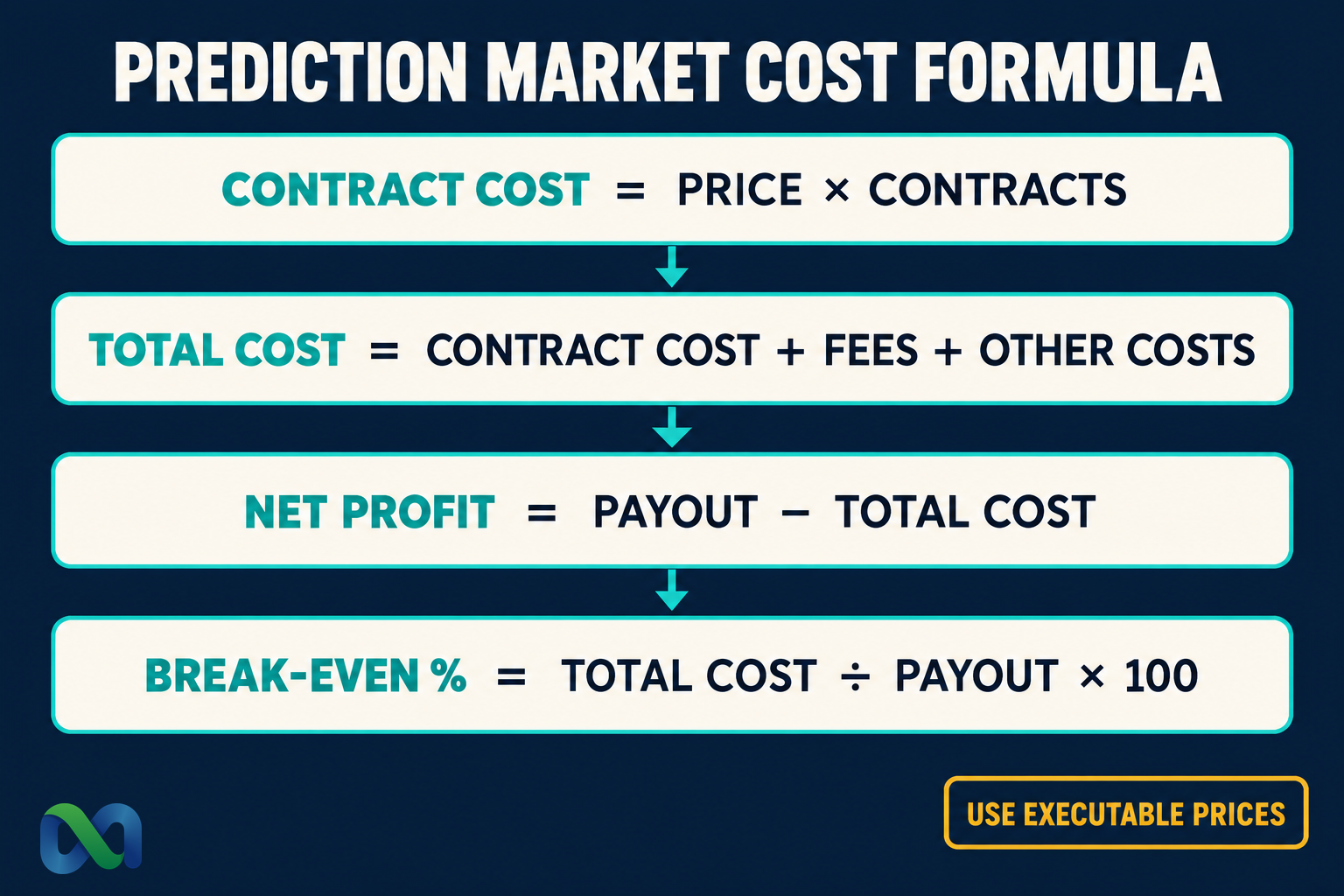
The break-even result is a cost-adjusted threshold, not a forecast. A 55¢ price may look like a 55% market-implied probability, but a fee raises the win rate needed to break even. The calculator shows that difference.
Worked Example: 100 Contracts at 55 Cents
Assume the executable ask is 55¢, you buy 100 contracts, the order preview shows a $1 trading fee, and you enter no other cost.
- Contract cost:
($0.55 × 100) = $55.00 - Trading fee:
$1.00 - Total cash at risk:
$56.00 - Winning settlement payout:
(100 × $1.00) = $100.00 - Net profit if correct:
($100.00 − $56.00) = $44.00 - Maximum loss if wrong:
$56.00 - Return on cost:
($44.00 ÷ $56.00) × 100 = 78.57% - Break-even probability:
($56.00 ÷ $100.00) × 100 = 56.00%
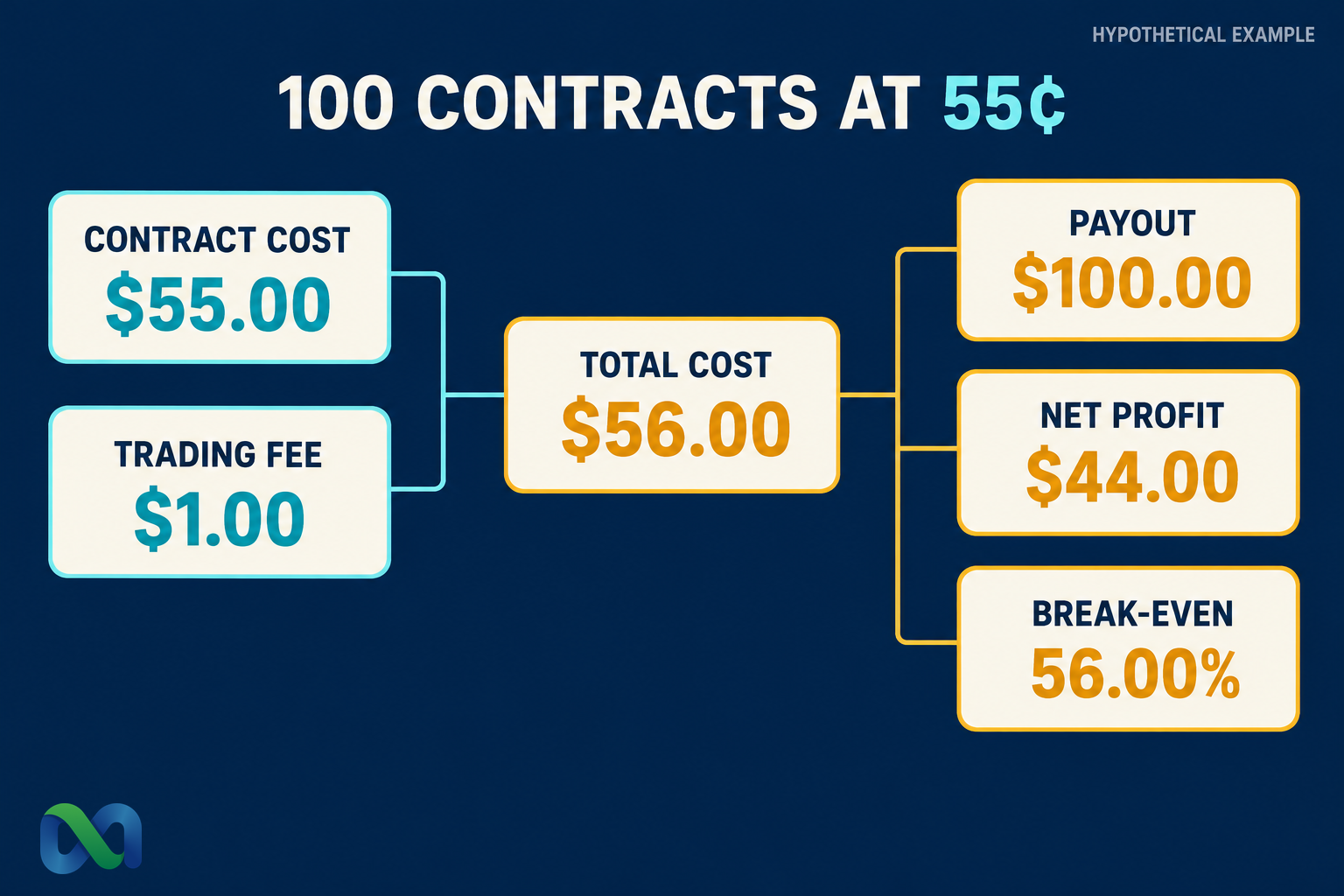
The $1 fee moves the break-even rate from the displayed 55% price to 56%. That one percentage point matters when comparing a small expected edge. A larger fee or added funding cost moves the threshold higher.
This example is hypothetical. It does not represent a live quote or promise that 100 contracts are available at 55¢.
Which Prediction Market Costs Should You Enter?
A useful comparison includes every cost that changes the cash outcome. Some costs are entered directly. Others must be reflected in the contract price you use.
Trading fee
Enter the exact fee in the order preview when possible. Do not assume that a platform-wide headline describes every market or order. If an entry and a later exit each charge a fee, add both only when you are specifically modeling that planned round trip.
Bid-ask spread
The spread is the gap between the best bid and best ask. The calculator does not add it as a separate field because the cost depends on how you enter and leave.
For an immediate buy, use the executable ask rather than the last trade or midpoint. If you are estimating an immediate round trip, compare the buy ask with the sell bid. Our bid-ask spread guide explains this difference.
Slippage
The best visible price may not cover your full quantity. If your order consumes several price levels, calculate the volume-weighted average fill and enter that price. You can learn the process in our guide to prediction-market slippage.
Funding and withdrawal costs
Include a funding or withdrawal charge only when it applies to your planned transaction. A fixed transfer fee can distort a small trade but become less important across a larger amount. Avoid allocating the same account-level cost to several trades at once.
Taxes
The calculator excludes taxes. Tax treatment depends on the product, platform documents, taxpayer, jurisdiction, and current guidance. Keep records of costs, fees, fills, settlements, and withdrawals, then consult a qualified tax professional for your situation.
How to Compare Two Platform Quotes
Run the calculator separately for each platform at the same timestamp and order size. A valid comparison requires more than matching market titles.
Check that both contracts use the same:
- outcome definition;
- settlement source;
- deadline and time zone;
- treatment of postponements, corrections, ties, or cancellations;
- executable quantity;
- entry side and order type; and
- hold-to-settlement assumption.
Then enter the executable price and displayed fee from each venue. Compare total cost and net profit, not the headline fee alone.
If one quote is 54¢ plus $2 in fees and another is 56¢ with no displayed fee, the cheaper headline price may not be the cheaper order. For 100 contracts:
- 54¢ plus $2 costs
$54 + $2 = $56; - 56¢ plus $0 also costs
$56.
Both have the same hold-to-settlement result before other costs. Liquidity, rules, legal access, and operational quality may still differ. Our guide to the best prediction market apps in the US shows how those factors affect a platform comparison.
What This Calculator Does Not Estimate
The result is only as good as the inputs. It does not predict whether the event will happen or whether your order will fill.
It also does not automatically model:
- a changing order book;
- partial fills;
- an early sale at a different price;
- separate exit fees;
- taxes or tax forms;
- currency conversion;
- account holds or withdrawal timing;
- contract-specific settlement exceptions; or
- legal availability in your location.
The CFTC’s prediction-market guide advises customers to verify the venue, understand the contract, review fees, and consider the risk of loss. A calculator can check arithmetic. It cannot replace those checks.
For the legal distinction between event contracts and wagers, read Is Kalshi gambling?. To separate regulatory status from trading and operational risk, see our Is Kalshi legit? review.
For a two-leg position, our prediction market arbitrage guide separates the fee calculation from the conditional payout and explains why matching contract rules and completing both orders matter.
For two complementary positions, use our prediction market arbitrage calculator to compare each leg’s quantity and cost, the two conditional outcomes and any unmatched exposure.
For a single directional position, use our prediction market expected value calculator to combine total costs with your own probability estimate and compare lower and higher assumptions. Expected net is different from the cash result of one settlement.
Frequently Asked Questions
How do I calculate profit on a prediction market contract?
For a winning binary contract that settles at $1, subtract the contract cost, trading fee, and other entered costs from the settlement payout. For 100 contracts bought at 55¢ with a $1 fee, the net profit is $44.
Does a 55-cent contract mean the break-even probability is 55%?
Only before added costs. If 100 contracts cost $55 and the fee is $1, the all-in cost is $56. The break-even probability is therefore 56% before tax.
Should I enter the bid, ask, midpoint, or last price?
Use the price you can execute for the intended order. An immediate buyer normally starts with the ask. A limit order may fill at another price or may not fill at all. A midpoint or last trade is not necessarily available.
Does the calculator include spread and slippage?
Not automatically. Use an executable or volume-weighted average price that already reflects the expected fill. If you plan to exit early, estimate the exit separately because the future bid is unknown.
What does maximum loss mean here?
For a fully paid binary contract held through a $0 settlement, the calculator treats the contract cost plus entered fees and other costs as the maximum loss. Other products or leveraged positions may work differently.
Can I use this calculator for No contracts?
Yes. Enter the executable price of the side you are buying. The same $1-or-$0 settlement math applies when that side is a standard fully paid binary contract.
Prediction Market Fee Calculator: Bottom Line
Use an executable price, the actual quantity, and the fee shown in the order preview. The calculator converts those inputs into total cost, payout, net profit, return on cost, maximum loss, and break-even probability.
Do not compare platforms from headline fees alone. Match the contract rules, timestamp, order size, and available depth. Then use the all-in result to see whether an apparent price advantage survives the real costs.