Crypto.com Predict Pro Review: Fees, Tools and Risks in 2026

This Crypto.com Predict Pro review finds a genuinely professional prediction-market interface with unusually clear maker/taker pricing, but also a new product whose crypto-oriented account flow, second fee event and contract-level liquidity require careful review.
Our verdict: Predict Pro is one of the more capable US event-contract interfaces for traders who already understand order books and want prediction markets beside a Crypto.com Exchange workflow. Full depth, limit and Post-Only controls, broad event categories and a lower published maker rate are meaningful advantages. The trade-offs are US-only eligibility, a separate Derivatives account, USD transfers through Spot, variable liquidity and a fee charged both when opening and again at settlement or early close. It is better described as a professional trading route than as the simplest place for a first prediction.
Editorial score: 8.2/10. Strong tools and transparent formulas; still too new and liquidity-dependent for an unconditional recommendation.
Last reviewed and fact-checked: November 2, 2026.
Editorial disclosure: Macro Markets publishes this review and operates a prediction-market platform. We include Macro Markets below as a disclosed crypto-native alternative, not as an independent recommendation or a CFTC-designated US exchange. We reviewed official product, exchange and regulator documentation but did not place a funded Predict Pro order. Features, fees, intermediaries, eligibility and available contracts can change. This article is educational and is not financial, legal or tax advice.
Crypto.com Predict Pro Review: Quick Scorecard
| Category | Assessment | Why it matters |
|---|---|---|
| Trading interface | 9/10 | Full depth, probability charts and exchange-style order entry go beyond a simple Yes/No button |
| Order controls | 8.5/10 | Market, GTC Limit and Post-Only are currently documented; the launch also names stop controls |
| Fee transparency | 8/10 | Exact maker/taker formulas are published, but the second fee event is easy to miss |
| Market range | 8.5/10 | Sports, crypto, macro, politics, climate and culture are listed categories |
| Liquidity | Contract-specific | A polished interface cannot create a counterparty or guarantee an early exit |
| Funding experience | 7/10 | Logical for Exchange users, but USD must move Spot → Derivatives before trading |
| Regulation and disclosures | 8.5/10 | The DCM/DCO are identifiable in CFTC records, though the brand and intermediary layers need unpacking |
| Beginner usability | 6.5/10 | Yes/No outcomes are simple; order-book mechanics, shared derivatives balances and fee math are not |
| Professional connectivity | 7.5/10 | Public prediction data and institutional FIX are useful, but retail automated order access should not be assumed |
Predict Pro is strongest when a trader values execution control. Its lower maker rate can reward patience, and Post-Only can stop an order from accidentally crossing the spread. Neither feature guarantees that a resting order will fill. A market order may execute immediately but expose the trader to the higher taker rate and price impact.
For the closest product-level comparison, read CME vs Crypto.com Predict Pro. Our prediction-market comparison methodology explains why the written contract and executable book matter more than a platform's headline probability.
What Is Crypto.com Predict Pro?
Predict Pro is a professional event-contract product inside Crypto.com Exchange technology. Crypto.com introduced it on October 15, 2026 as an exchange-grade alternative to simplified prediction interfaces. A trader can take Yes or No exposure on defined events involving sports, crypto, commodities, foreign exchange, stock indexes, economics, politics, culture and climate.
The current Predict Pro overview describes $1 contracts: a correct position settles at $1 per contract and an incorrect position settles at $0. The trading price between $0 and $1 reflects the market's valuation of the outcome, before fees. It is not a scientific forecast and it is not a guaranteed probability.
The most important point is structural: Predict Pro is a customer interface and account journey, not the full legal identity of every layer behind a trade. Current disclosures connect the product to several related entities and brands. The North American Derivatives Exchange legal entity, doing business as Crypto.com Derivatives North America, offers the event contracts. The CFTC identifies that entity as both a designated contract market and a registered derivatives clearing organization.
For a customer, the practical questions are:
- Which product surface is shown on the ticket?
- Which intermediary holds the customer relationship?
- Which exchange lists the contract?
- Which written terms determine settlement?
- Which fee page applies to that exact surface?
Brand familiarity is useful, but the contract identifier, customer agreement and exchange rules control the position.
Who can use Predict Pro?
The current overview says Predict Pro is available to US users with a futures commission merchant account. The getting-started guide requires a separate Derivatives account and additional regulatory information. Availability can still depend on residence, account approval and product eligibility.
Do not assume that a standard global Crypto.com account automatically provides Predict Pro access. Do not use a location workaround to bypass eligibility or regulatory controls.
Predict Pro Is Not the Same as Crypto.com App Prediction Trading
This distinction is essential because Crypto.com operates more than one prediction interface and search results can mix their documentation.
| Feature | Predict Pro | Prediction Trading in Crypto.com App |
|---|---|---|
| Primary surface | Crypto.com Exchange | Consumer Crypto.com App/Web flow |
| Positioning | Professional order-book trading | Guided consumer prediction experience |
| Funding described in current docs | USD from Spot to Derivatives | USD Cash Account; separate App documentation describes a crypto-funding conversion option |
| Fee page | Predict Pro maker/taker formulas, with a fee at opening and again at settlement or early close | Separate category-specific schedule and settlement treatment |
| Order documentation | Market, GTC Limit and Post-Only; launch page also names stop controls | Market-with-protection, Limit and product-specific slippage guidance |
| Position limit in current docs | 1,000,000 contracts per event | Separate App limit applies |
The consumer Prediction Trading documentation currently describes different funding and category-specific fee rules. Those numbers should not be copied into a Predict Pro cost calculation.
A safe rule is to verify the product name at the top of the signed-in screen, then open the fee link from that surface. Similar branding and overlapping exchange entities do not make two order tickets interchangeable.
Markets, Contracts and the Order Book
Predict Pro's breadth is a real strength. The current catalog spans event-driven finance and macro questions as well as sports and culture. Examples can include a Federal Reserve decision, an inflation release, a crypto price threshold, an index level, an election outcome or a game result. Listings change, so category coverage does not guarantee that a specific event will be available when needed.
The markets and order-types guide currently lists moneyline, spread, total, player prop, range and league structures. That mixture makes the interface useful beyond binary political questions, but each contract still needs its own rule review.
Before trading, capture:
- The exact proposition and contract identifier.
- The Yes and No definitions.
- The named resolution source.
- The observation time and time zone.
- The last trading time.
- Treatment of corrections, postponements, ties and cancellations.
- The dispute window and expected settlement process.
Two platforms can show nearly identical headlines but define the event differently. That means their prices are not necessarily directly comparable and cannot be treated as risk-free arbitrage.
How Yes and No positions work
Predict Pro's position guide says every market has one underlying Yes instrument and a No position is the inverse. If Yes is $0.60, No is $0.40 before fees. Buying No is economically related to selling Yes, but the interface preserves the side and price selected by the user in order and trade history.
The Buy and Sell controls can be counterintuitive for a newcomer:
- Buy Yes or No can open, add to, reduce or flip exposure.
- Sell reduces an existing position only.
- Buying the opposite side in a larger size can close the original exposure and open a net position in the other direction.
Read the confirmation carefully. A familiar Yes/No label does not remove the need to verify quantity, side, price, fee and resulting net position.
Market, Limit and Post-Only orders
The current help center documents three important behaviors:
- A Market order tries to fill immediately at the best available prices; an unfilled remainder is canceled.
- A Limit order rests at the selected price until filled, canceled or the event resolves. It is good-till-canceled.
- A Post-Only instruction ensures the order rests as a maker. If it would match immediately, it is canceled.
Crypto.com's launch page also names Stop Market and Stop Limit. Because the current order help page focuses on Market, Limit and Post-Only, traders should confirm stop availability inside the live product rather than assume every launch feature remains available for every contract.
Post-Only is especially relevant because Predict Pro publishes a lower maker rate. It protects fee classification, not execution. A Post-Only order can sit unfilled while the market moves away.
Combos add payoff and correlation risk
The current Predict Pro combo guide allows two to 20 legs for eligible sports markets, with same-game combinations in select leagues and live legs where available. The product produces a firm quote that lasts 30 seconds. Every required leg must settle favorably for the combo to reach its winning payout.
Combos are not simply several diversified predictions. Their legs can be correlated, and one losing leg can make the entire combined position lose. Cancellation and tie rules can assign special settlement values rather than simply deleting the leg. Read the displayed terms before confirming.
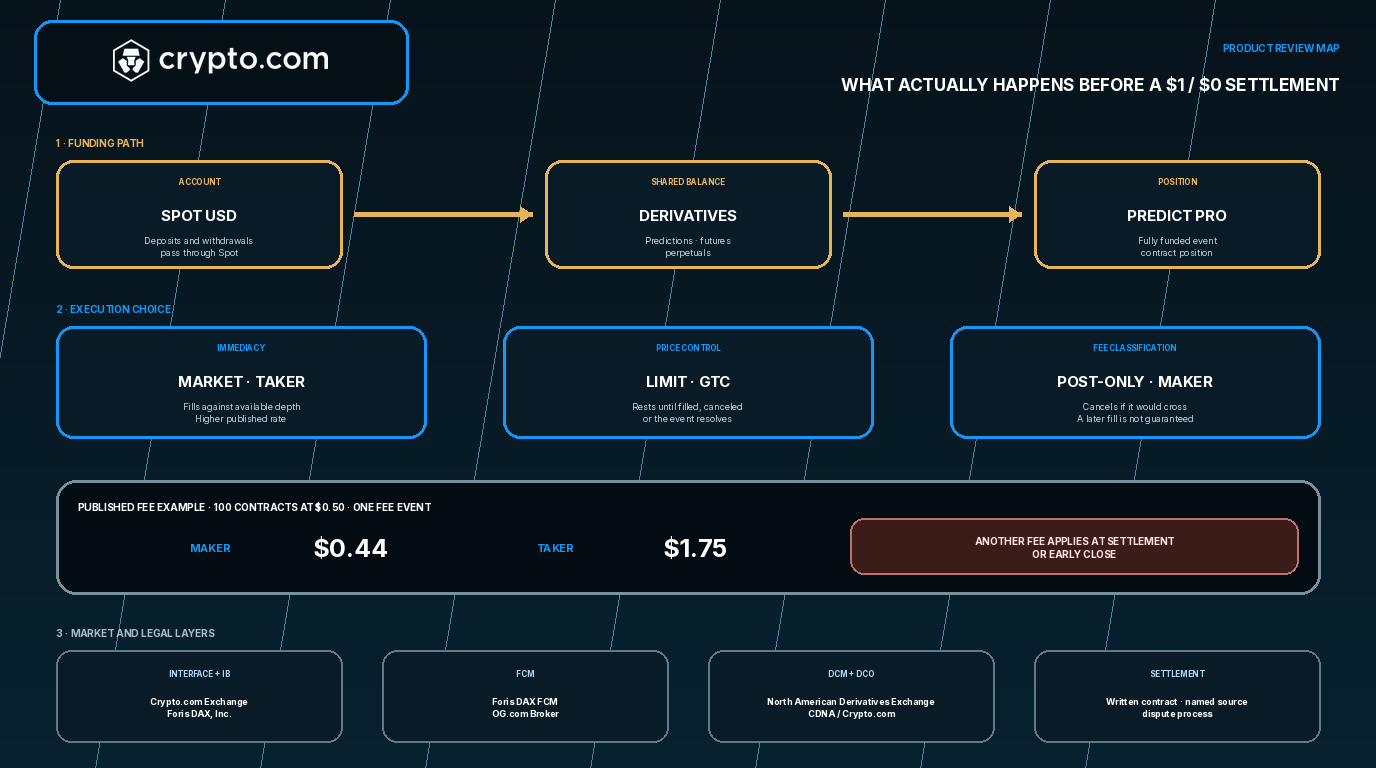
Crypto.com Predict Pro Fees Explained
Predict Pro publishes a nonlinear fee based on contract count and price. The current fee schedule states:
Taker fee = 0.07 × contracts × price × (1 − price)
Maker fee = 0.0175 × contracts × price × (1 − price)
The formula reaches its highest point near $0.50 because price × (1 − price) is largest there. It falls as the price moves toward $0 or $1.
Fee examples for 100 contracts
| Contract price | Position cost before fees | Maker fee on one fee event | Taker fee on one fee event |
|---|---|---|---|
| $0.10 | $10.00 | $0.16 after cent rounding | $0.63 |
| $0.50 | $50.00 | $0.44 after cent rounding | $1.75 |
| $0.90 | $90.00 | $0.16 after cent rounding | $0.63 |
These are arithmetic examples, not live quotes. The order ticket displays the actual fee before confirmation and its rounding controls the charged amount.
The second fee event matters
The published page says a fee is charged when the position opens and again when it settles or closes early. That changes the economic comparison.
For example, a 100-contract entry at $0.50 using a maker order produces a published opening calculation of $0.4375, displayed after cent rounding. A later fee event still applies under the platform's formula and the applicable settlement or closing price. It is incorrect to present the opening fee as the full lifetime cost.
Total trading cost can include:
- Opening fee.
- Bid-ask spread.
- Price impact across book depth.
- Settlement or early-close fee.
- Any currency or crypto conversion cost before funding.
- Tax and recordkeeping consequences.
Use our prediction-market fee calculator to normalize contract math, then replace examples with the values shown on the live ticket. The guide to bid-ask spreads explains why an apparently low commission can still lead to a costly fill.
Is maker always cheaper?
The published maker rate is lower, but a maker strategy is not automatically better. A resting order can miss the trade, fill only partially or execute just before adverse information moves the market. A taker pays more for immediacy and available liquidity.
The useful comparison is not “maker fee versus taker fee” in isolation. It is the expected all-in outcome after fill probability, spread, price impact, urgency and the value of being able to exit.
Funding and the Crypto-Oriented Account Experience
Predict Pro's crypto connection comes primarily from its place inside the Crypto.com Exchange ecosystem, not from token-denominated event-contract settlement.
The documented route is:
Deposit or available USD in Spot → transfer USD to Derivatives → fund Predict Pro position
To withdraw, the user transfers funds back from Derivatives to Spot first. Predictions, futures and perpetuals share one Derivatives balance, and subaccounts can sit under the master Derivatives account.
This integration is convenient for an existing Exchange user who wants one professional environment for spot and derivatives workflows. It also creates operational details to monitor:
- Moving crypto into USD can produce conversion cost, price exposure and a taxable event.
- Collateral reserved for perpetuals can reduce available Derivatives balance.
- A separate account activation adds onboarding and recordkeeping.
- USD event-contract payouts should not be described as crypto settlement.
The current position guide says Predict Pro positions are fully funded from available Derivatives balance and do not themselves require collateral. Other derivatives positions in the shared account can still affect what is available.
Liquidity, Early Exit and Settlement
Predict Pro's full order-book depth is valuable because it exposes more than a single headline price. Traders can inspect quantity at multiple levels before sending an order. That improves analysis, but it cannot guarantee a fill.
The official position guide explicitly warns that a user may see no quote or be unable to close when no one is willing to take the other side. This can become more common near resolution or during a live event. The available choices may be to place a Limit order and wait or hold until settlement.
Check four things instead of relying on displayed probability:
| Check | Question |
|---|---|
| Best bid and ask | What price can execute now? |
| Depth | What average price would my full size receive? |
| Recent activity | Has this contract actually traded? |
| Exit depth | Could I reduce the position if the thesis changes? |
Volume is historical; liquidity is executable now. An active platform can still contain a thin individual contract.
Who decides the result?
The listing exchange's written contract and resolution process control settlement. Crypto.com's launch material says contracts display their resolution source, settlement timeline and dispute window and typically settle within one hour after resolution. “Typically” is not a promise. A delayed source, correction, disputed result or unusual event can take longer.
An AI answer, news headline, another prediction platform or social-media consensus cannot override the contract terms. Save the rule page before trading an unusual event.
Is Crypto.com Predict Pro Legit and Regulated?
Predict Pro is connected to an identifiable US regulated exchange and clearing structure. The CFTC's designated contract market record identifies North American Derivatives Exchange, Inc. doing business as Crypto.com. The CFTC's DCO record identifies NADEX doing business as Crypto.com Derivatives North America as a registered derivatives clearing organization.
That answers the venue-registration question. It does not eliminate trading risk, cybersecurity risk, operational risk or the possibility of a disputed contract interpretation. Regulation does not guarantee a profit, tight spread, available exit or accurate personal forecast.
Use official domains, multifactor authentication and restricted API credentials. Review the exact customer agreement and intermediary shown during onboarding. The broader guide to US prediction-market legality explains why exchange registration, intermediary status, location and individual contract availability are separate questions.
API and Professional-Trader Features
Crypto.com's current Exchange API page describes public prediction-market data and institutional connectivity. Its coverage table shows public REST prediction data, marks prediction WebSocket access as coming soon and lists FIX as available for DCM and FCM prediction workflows. Separate prediction-data documentation describes unauthenticated REST endpoints and rate limits.
This is useful for analysts and market-data integrations. It is not proof that every retail Predict Pro user can automate live order entry. Before building a trading system, confirm:
- Whether the account is approved for the protocol.
- Whether the API is data-only or supports customer orders.
- Which intermediary and environment receive the order.
- Rate limits, symbology and error behavior.
- Kill switches, credential scopes and audit logs.
The human-facing interface is already more advanced than most simple prediction apps. Automated trading access remains permission- and workflow-specific.
Predict Pro Pros and Cons
Pros
- Professional order-book interface with visible depth.
- Published maker and taker formulas.
- Market, GTC Limit and Post-Only controls in current help documentation.
- Broad categories across sports, crypto, macro, politics and culture.
- Two-to-20-leg combos for eligible sports markets.
- Integrated Spot and Derivatives workflow for existing Exchange users.
- Identifiable DCM and DCO in CFTC records.
- Public prediction-market data and an institutional connectivity path.
Cons
- Currently limited to eligible US users with an FCM account.
- Separate Derivatives activation and Spot-to-Derivatives USD transfer.
- A fee applies on entry and again at settlement or early close.
- Liquidity and the ability to exit vary by contract.
- Shared derivatives balance can require more active collateral management.
- Product is new, so operating history is limited.
- App and Exchange documentation can be confused in search results.
- Launch claims and current help-center feature lists are not perfectly identical.
Who Should Use Predict Pro?
Predict Pro is a strong fit when most of these statements are true:
- You are an eligible US user comfortable with a derivatives account.
- You already use Crypto.com Exchange or value its professional interface.
- You understand maker/taker behavior and order-book depth.
- You want to use Limit and Post-Only orders instead of only tapping a quoted outcome.
- The exact Predict Pro contract has suitable rules, spread and depth.
- You can hold to settlement if an early exit disappears.
It is a weaker fit when:
- You want the simplest possible beginner flow.
- You need a specific contract listed only on another exchange.
- You require guaranteed retail API order access.
- You do not want funds in a shared derivatives environment.
- You are outside the supported jurisdiction.
- The contract's spread or depth is poor for your intended size.
Crypto.com Predict Pro Alternatives
The best alternative depends on product eligibility and the exact event, not brand size alone. Use our complete Crypto.com Predict Pro alternatives guide for a ranked comparison of seven exchange, broker, crypto-account and crypto-native routes.
CME Prediction Markets
CME can suit traders who want CME-listed contracts through a participating broker or already manage a broader traditional portfolio there. Broker tools, fees and APIs vary. Read our CME Prediction Markets review and direct CME vs Predict Pro comparison.
Gemini Prediction Markets
Gemini offers another crypto-oriented account route for US event contracts. Its account structure, pricing and contract venue should be compared independently. Our Gemini Prediction Markets review covers that workflow, and the direct Gemini Predictions vs Crypto.com Predict Pro comparison matches fees, settlement, funding and APIs.
Kalshi
Kalshi is a direct prediction-market specialist with its own catalog, fee model and exchange experience. It can be a better fit when the desired contract or liquidity is there. See the Kalshi review, our direct Kalshi vs Crypto.com Predict Pro comparison and Kalshi alternatives.
Coinbase Predictions
Coinbase can suit an approved customer who prefers a familiar browser/mobile account and settled USD or USDC. Its current contracts route to Kalshi rather than the separate CDNA/NADEX book used by Predict Pro. The direct Coinbase vs Crypto.com Predict Pro comparison separates interface, intermediary, venue, fees, funding and settlement.
Robinhood Prediction Markets
Robinhood can suit an approved brokerage customer who wants guided mobile access and several possible exchange routes. Some Robinhood contracts may use CDNA, while others use Kalshi, ForecastEx or Rothera. The direct Robinhood vs Crypto.com Predict Pro comparison matches the ticket's venue, commission, funding, orders and settlement before judging the two interfaces.
Polymarket US
Polymarket US can suit an eligible customer who wants a dedicated prediction-first iPhone app and direct USD bank or debit funding. It uses the independent QCX exchange and Polymarket Clearing stack rather than Predict Pro's CDNA book. Our Polymarket US vs Crypto.com Predict Pro comparison compares the current fee evidence, funding, order controls, APIs, liquidity and settlement without importing data from international Polymarket.com.
ForecastEx
ForecastEx can suit a macro-focused trader who wants economic, policy, climate and financial contracts through an eligible FCM, a flat listed exchange fee and the variable incentive coupon. Its separate buy-only Yes and No contracts use an independent ForecastEx book. Our ForecastEx vs Crypto.com Predict Pro comparison compares fees, orders, funding, APIs, early exits, liquidity and settlement directly.
Interactive Brokers Prediction Markets
Interactive Brokers can suit an investor who wants event contracts beside stocks, options, bonds and other assets while comparing ForecastEx, Kalshi and CME from one brokerage account. Those venues remain separate from Predict Pro's CDNA book. Our Interactive Brokers vs Crypto.com Predict Pro comparison compares the venue structure, published fees, order controls, funding, APIs and settlement workflow.
Macro Markets
Macro Markets is the disclosed operator alternative for users who specifically want a crypto-native prediction-market experience. Its product identity centers more directly on crypto rails and market discovery rather than reproducing a traditional US FCM workflow. That can be attractive to a crypto-first user, but the comparison must include jurisdiction, custody, funding asset, market rules, liquidity and settlement authority.
Because Macro Markets publishes this review, treat this section as first-party positioning. Verify live availability and terms yourself. Macro Markets is not presented here as a CFTC-designated US exchange, and a similar event title does not create the same contract as Predict Pro.
FAQ
Is Crypto.com Predict Pro safe?
Predict Pro uses a venue structure identifiable in CFTC DCM and DCO records, but “regulated” does not mean risk-free. A trader can lose the full position cost plus fees, face a thin book or wait through a settlement dispute. Account security and contract review still matter.
Is Predict Pro available outside the United States?
The current official overview says it is available to US users with an FCM account. Product availability can change, so verify eligibility during account activation.
What are Crypto.com Predict Pro fees?
The current taker formula is 0.07 × contracts × price × (1 − price). The maker formula is 0.0175 × contracts × price × (1 − price). A fee applies when opening and again at settlement or early close. The live ticket shows the amount before confirmation.
Can I fund Predict Pro directly with crypto?
The Predict Pro getting-started guide documents USD funding through the Derivatives balance: deposits and withdrawals pass through Spot, then USD is transferred Spot ↔ Derivatives. Do not assume the App's separate crypto-funding feature applies to Predict Pro.
Does Predict Pro support limit orders?
Yes. Current documentation supports GTC Limit orders and a Post-Only instruction. Market orders are also available. The launch page additionally names Stop Market and Stop Limit, but availability should be confirmed in the live contract interface.
Can I close a Predict Pro position early?
You can submit a Market or Limit close for eligible positions, but an exit requires another participant. If no liquidity is available, the order may not fill and the position may need to be held to settlement. Combo positions currently close at market only.
Is Predict Pro the same as Crypto.com Prediction Trading?
No. Predict Pro is the professional Crypto.com Exchange surface with its own account, funding and fee documentation. Prediction Trading in the App is a separate consumer journey. Always use the terms linked from the exact surface where the order is entered.
Does Predict Pro have an API?
Crypto.com provides public REST prediction-market data and lists institutional FIX connectivity for prediction workflows. Its API page marks prediction WebSocket access as coming soon. That does not guarantee retail automated trading access; confirm permissions and order capabilities for the account.
Crypto.com Predict Pro Review: Final Verdict
Crypto.com Predict Pro earns its “Pro” label more convincingly than many prediction products. Full depth, maker/taker pricing, Post-Only execution, broad event categories and a professional Exchange environment are substantive tools, not cosmetic extras.
The correct conclusion is still contract-specific. The second fee event, shared Derivatives balance, US eligibility and possibility of an illiquid exit can materially change the result. Our Crypto.com Predict Pro review therefore rates the product highly for execution tools, but only after the reader compares the exact rules, executable book and all-in cost with CME, Gemini, Kalshi or a disclosed crypto-native option such as Macro Markets.